SSyndigo Global Community
Turn on suggestions
Auto-suggest helps you quickly narrow down your search results by suggesting possible matches as you type.
Showing results for
- Customer Community
- Item Management
- IM Questions
- Publish Errors
Options
- Subscribe to RSS Feed
- Mark Topic as New
- Mark Topic as Read
- Float this Topic for Current User
- Bookmark
- Subscribe
- Mute
- Printer Friendly Page

Options
- Mark as New
- Bookmark
- Subscribe
- Mute
- Subscribe to RSS Feed
- Permalink
- Report Inappropriate Content
03-18-2026 10:25 AM
Hi all,
I'm trying to figure out how to fix these last 2 errors with publishing items.
So I have almost all my 36 items saved and validated and I want to publish one of them as a test but I keep getting these two errors?
2 Error(s)
Base Unit Indicator (isBaseUnit) should only be true for the lowest level Item in the hierarchy. If ChildTradeItem/gtin is not empty then Base Unit Indicator (isBaseUnit) must be equal to false.
Ordering Unit Indicator (isOrderableUnit) must be true for at least one GTIN within a hierarchical configuration.
I have put every item in as an each and I thought that would be OK?
Thanks for any help!
Matt
1 Solution
Accepted Solutions

Options
- Mark as New
- Bookmark
- Subscribe
- Mute
- Subscribe to RSS Feed
- Permalink
- Report Inappropriate Content
03-18-2026 11:39 AM
Hello @WildBird24 . Thank you for utilizing our customer community.
Below, I have provided an explanation regarding the errors you mentioned, using your existing hierarchy as an example:
- Since you currently have only an "Each" item created in your hierarchy, you will need to correct all the mentioned errors on this item. If "Each" items are to be placed in a "Case" and that is how the item will be shipped, you will also need to create an item for the "Case" and link them together.
-
Base Unit Indicator: This should be set to True for the lowest level item in your hierarchy and False for the items above it. If your hierarchy consists solely of the "Each" item, mark it as True. If you add a "Case" item, then the "Case" should be marked as False.
- Ordering Unit Indicator: This should be True for items that can be ordered by the retailer and False for those that cannot. For example, if you create a "Case" item that the retailer can only order, then the "Case" would have the indicator set to True, and the "Each" would be set to False. However, if the "Each" remains the only item in your hierarchy, it should have the Ordering Unit Indicator set to True.


7 Replies
Options
- Mark as New
- Bookmark
- Subscribe
- Mute
- Subscribe to RSS Feed
- Permalink
- Report Inappropriate Content
03-18-2026 11:39 AM
Hello @WildBird24 . Thank you for utilizing our customer community.
Below, I have provided an explanation regarding the errors you mentioned, using your existing hierarchy as an example:
- Since you currently have only an "Each" item created in your hierarchy, you will need to correct all the mentioned errors on this item. If "Each" items are to be placed in a "Case" and that is how the item will be shipped, you will also need to create an item for the "Case" and link them together.
-
Base Unit Indicator: This should be set to True for the lowest level item in your hierarchy and False for the items above it. If your hierarchy consists solely of the "Each" item, mark it as True. If you add a "Case" item, then the "Case" should be marked as False.
- Ordering Unit Indicator: This should be True for items that can be ordered by the retailer and False for those that cannot. For example, if you create a "Case" item that the retailer can only order, then the "Case" would have the indicator set to True, and the "Each" would be set to False. However, if the "Each" remains the only item in your hierarchy, it should have the Ordering Unit Indicator set to True.
Options
- Mark as New
- Bookmark
- Subscribe
- Mute
- Subscribe to RSS Feed
- Permalink
- Report Inappropriate Content
03-19-2026 11:41 AM
That worked it seems. Thanks a bunch for the help!
Matt
Options
- Mark as New
- Bookmark
- Subscribe
- Mute
- Subscribe to RSS Feed
- Permalink
- Report Inappropriate Content
05-20-2026 02:30 PM - edited 05-20-2026 03:41 PM
Can anyone assist in how to correct the error I receive when trying to publish?
Base Unit Indicator (isBaseUnit) should only be true for the lowest level Item in the hierarchy. If ChildTradeItem/gtin is not empty then Base Unit Indicator (isBaseUnit) must be equal to false. I have followed the example from Theo above on 03-18-2026 11:39 AM as that aligns with my each/case set up but sill receive the error. Thanks

Options
- Mark as New
- Bookmark
- Subscribe
- Mute
- Subscribe to RSS Feed
- Permalink
- Report Inappropriate Content
05-20-2026 03:58 PM
Hello @ccasanova and thank you for reaching out to our customer community. Welcome.
To correct the error you are receiving, please ensure the Base Unit Indicator is True for the lowest level(s) of the hierarchy, only. When you have several items set up as the lowest levels (for example a Display with 3 different consumer units), the Base Unit Indicator should be True for all items that are set up as the lowest leve (the 3 different consumer units, in this hypothetical example, and False for the Display).
If the issue persists, please help us with the GTIN/Item ID to asssist further. Thank you.
Options
- Mark as New
- Bookmark
- Subscribe
- Mute
- Subscribe to RSS Feed
- Permalink
- Report Inappropriate Content
05-20-2026 04:03 PM

Options
- Mark as New
- Bookmark
- Subscribe
- Mute
- Subscribe to RSS Feed
- Permalink
- Report Inappropriate Content
05-20-2026 05:53 PM
Thank you very much for the reply and additional information, @ccasanova.
The main issue is the items are linked with the Each as the highest hierarchy level instead of the Case:


We have an article here explaining how to unlink the items: How to Unlink Items in IM.
Once unlinked, please start the linking process from the Case, as the system always links from the item you are starting downwards, therefore, if you start from the Each, you can only link the Case inside the Each. More details about linking can be found here, please: How to Link Items to create a Hierarchy.
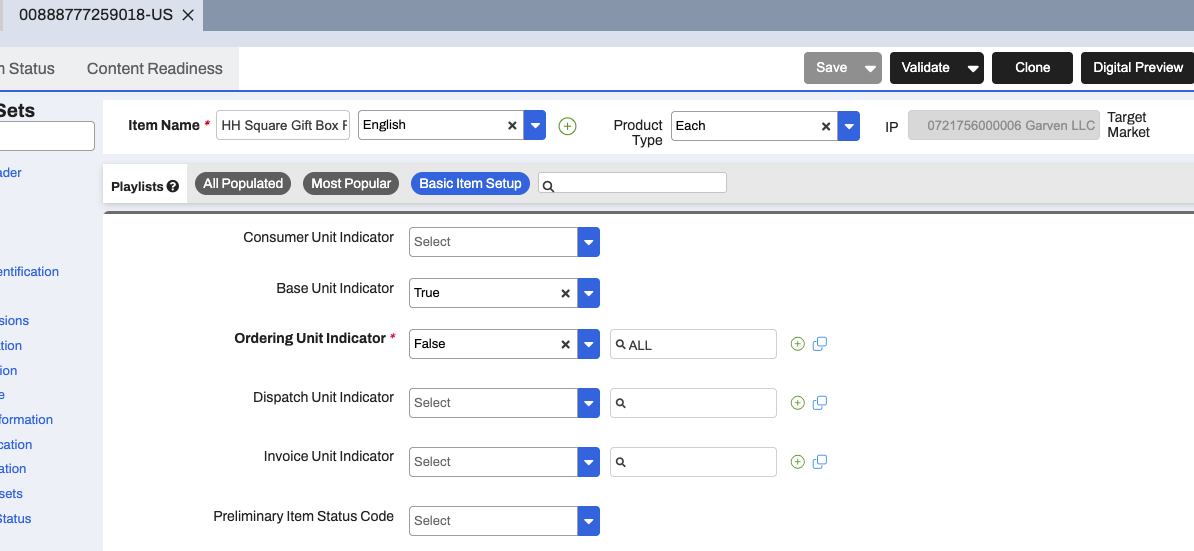
Regarding the items themselves, we also recommend populating the Consumer Unit Indicator (indicating which item is sold in the stores to the customers, usually the Each only, but there are exceptions) and Dispatch Unit Indicator (how the item is dispatched to the retailer, usually the highest hierarchy level, in this instance - the Case).
Thank you.
Options
- Mark as New
- Bookmark
- Subscribe
- Mute
- Subscribe to RSS Feed
- Permalink
- Report Inappropriate Content
05-21-2026 09:26 AM
Thank you and this worked. Appreciate the assistance.

Related Content
- Publication Errors Net/Gross Weight & Ti-Hi Issues in _Ask A Question for Item Management (IM)
- Publication Error Gross Weight Case vs Gross Weight Each in _Ask A Question for Item Management (IM)
- Kwik Trip Question in _Ask A Question for Item Management (IM)
- Error Code the item is not currently active in _Ask A Question for Item Management (IM)
- Transportation Classification - Limited Quantity in _Ask A Question for Item Management (IM)
