11WorldSync Global Community
Turn on suggestions
Auto-suggest helps you quickly narrow down your search results by suggesting possible matches as you type.
Showing results for
- Customer Community
- Item Management
- IM Questions
- Re: Nine new items Published In October. No status...
Options
- Subscribe to RSS Feed
- Mark Topic as New
- Mark Topic as Read
- Float this Topic for Current User
- Bookmark
- Subscribe
- Mute
- Printer Friendly Page

Options
- Mark as New
- Bookmark
- Subscribe
- Mute
- Subscribe to RSS Feed
- Permalink
- Report Inappropriate Content
11-06-2025 04:06 PM
Good afternoon,
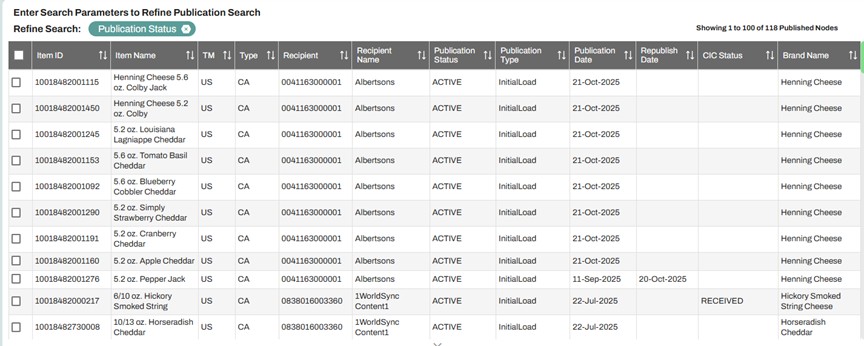
Newbie here...I published 9 items Oct. 20 and 21st 2025. What happens next? Am I missing a step? There has been no CIC status or any update since published. The recipient tells me they can't see them yet. I have attached the items gtins as a picture. If you need a written-out list of the items I can do that. Thank you.
4 Solutions
Accepted Solutions


Options
- Mark as New
- Bookmark
- Subscribe
- Mute
- Subscribe to RSS Feed
- Permalink
- Report Inappropriate Content
11-06-2025 05:04 PM
Hello @1914 and welcome to the Community. It looks like you are attempting to get your items over to Albertsons. The GLN you would need to publish to for Albertsons is 0321130000013. Once published to this GLN, the items will flow over to the Product Introduction tool. In this tool, you would need to top off your items to submit to Albertsons. More information on this can be found on the following Community training link for Albertsons.
https://community.1worldsync.com/t5/Albertsons-Training/ct-p/AlbertsonsTraining
Options
- Mark as New
- Bookmark
- Subscribe
- Mute
- Subscribe to RSS Feed
- Permalink
- Report Inappropriate Content
11-07-2025 10:21 AM
Thank you for responding and adding the training link for Albertsons. I will check into this and try to get published to that GLN. However, I went into IM and these 9 items now say recipient name is United National Foods?? I did not make any changes or republish anything yet. How did that happen?


Options
- Mark as New
- Bookmark
- Subscribe
- Mute
- Subscribe to RSS Feed
- Permalink
- Report Inappropriate Content
11-07-2025 10:46 AM
Hello @1914 and thank you for the follow-up.
On October we can see 10 items published to GLN 0041163000001 for United National Foods.
In a nutshell, specifically for Albertsons, items need to first be published to GLN 0321130000013 as New, and then topped-off in Product Introduction. You can find more details about the process here starting from Training Module 9: https://community.1worldsync.com/t5/Training-Modules/tkb-p/TrainingModules
I hope this helps. Thanks.

Options
- Mark as New
- Bookmark
- Subscribe
- Mute
- Subscribe to RSS Feed
- Permalink
- Report Inappropriate Content
11-07-2025 12:06 PM
Hello @1914,
Thank you for your reply.
To publish your items to Albertsons (GLN: 0321130000013), please follow the steps below:
How to Publish & Confirm Sync Status in Item Management - Quick Sheets
If you do not need the publications to United Natural Foods, Inc., you can withdraw them from Publications> Manage Publications.
Please do not hesitate to let us know if there is anything else we can help with.
Thank you and have a lovely day!
5 Replies
Options
- Mark as New
- Bookmark
- Subscribe
- Mute
- Subscribe to RSS Feed
- Permalink
- Report Inappropriate Content
11-06-2025 05:04 PM
Hello @1914 and welcome to the Community. It looks like you are attempting to get your items over to Albertsons. The GLN you would need to publish to for Albertsons is 0321130000013. Once published to this GLN, the items will flow over to the Product Introduction tool. In this tool, you would need to top off your items to submit to Albertsons. More information on this can be found on the following Community training link for Albertsons.
https://community.1worldsync.com/t5/Albertsons-Training/ct-p/AlbertsonsTraining
Options
- Mark as New
- Bookmark
- Subscribe
- Mute
- Subscribe to RSS Feed
- Permalink
- Report Inappropriate Content
11-07-2025 10:21 AM
Thank you for responding and adding the training link for Albertsons. I will check into this and try to get published to that GLN. However, I went into IM and these 9 items now say recipient name is United National Foods?? I did not make any changes or republish anything yet. How did that happen?
Options
- Mark as New
- Bookmark
- Subscribe
- Mute
- Subscribe to RSS Feed
- Permalink
- Report Inappropriate Content
11-07-2025 10:46 AM
Hello @1914 and thank you for the follow-up.
On October we can see 10 items published to GLN 0041163000001 for United National Foods.
In a nutshell, specifically for Albertsons, items need to first be published to GLN 0321130000013 as New, and then topped-off in Product Introduction. You can find more details about the process here starting from Training Module 9: https://community.1worldsync.com/t5/Training-Modules/tkb-p/TrainingModules
I hope this helps. Thanks.
Options
- Mark as New
- Bookmark
- Subscribe
- Mute
- Subscribe to RSS Feed
- Permalink
- Report Inappropriate Content
11-07-2025 11:43 AM
Thanks for the response. Do I need to delete these publications and start over? Withdraw? I tried to republish one of the items but it didn’t let me choose new recipient. I only could change it to “new”.
Options
- Mark as New
- Bookmark
- Subscribe
- Mute
- Subscribe to RSS Feed
- Permalink
- Report Inappropriate Content
11-07-2025 12:06 PM
Hello @1914,
Thank you for your reply.
To publish your items to Albertsons (GLN: 0321130000013), please follow the steps below:
How to Publish & Confirm Sync Status in Item Management - Quick Sheets
If you do not need the publications to United Natural Foods, Inc., you can withdraw them from Publications> Manage Publications.
Please do not hesitate to let us know if there is anything else we can help with.
Thank you and have a lovely day!

Related Content
- Nine new items Published In October. No status updates? in _Ask A Question for Item Management (IM)
- Kroger API Publications in _Ask A Question for Item Management (IM)
- Item Attribute Update in _Ask A Question for Item Management (IM)
- SYSCO - Republish after updates? in _Ask A Question for Item Management (IM)
- How do I update an Item ID after published? in _Ask A Question for Item Management (IM)
