11WorldSync Global Community
Turn on suggestions
Auto-suggest helps you quickly narrow down your search results by suggesting possible matches as you type.
Showing results for
- Customer Community
- Item Management
- IM Questions
- FSMA204 Required Attributes Discrepancies
Options
- Subscribe to RSS Feed
- Mark Topic as New
- Mark Topic as Read
- Float this Topic for Current User
- Bookmark
- Subscribe
- Mute
- Printer Friendly Page

Options
- Mark as New
- Bookmark
- Subscribe
- Mute
- Subscribe to RSS Feed
- Permalink
- Report Inappropriate Content
04-23-2025 09:29 AM
Good morning team!
I was updating an item in 1WS to include the new FSMA204 requirements and noticed that there are differences from the chart provided after the webinar on March 13th, 2025 to what I currently see in 1WS. The attributes not mentioned during the webinar that I now see on the website are: Regulatory Agency, Regulatory Act Compliance Level Code (where I picked "Exempt") and Regulation Community Level Code.
The one I cannot find on the website, which was mentioned during the webinar is: Regulation Restrictions and Descriptors (NOT_COVERED_BY_FTL or KILL_STEP_APPLIED).
Thanks in advance for your guidance in this matter.
29 Replies

Options
- Mark as New
- Bookmark
- Subscribe
- Mute
- Subscribe to RSS Feed
- Permalink
- Report Inappropriate Content
05-29-2025 05:20 PM
Hello, I am trying to add Regulatory Compliance for Sysco items and I am unable to pull up the Regulatory Compliance section when I type in Sysco. Can you please advise how I can update


Options
- Mark as New
- Bookmark
- Subscribe
- Mute
- Subscribe to RSS Feed
- Permalink
- Report Inappropriate Content
05-29-2025 06:08 PM
Hello @imeldae, thank you for continuing the use of the community. Welcome back.
For the required fields for FSMA204 to be visible on your item, please add the Food and Beverage Products Playlist (more details here Playlists Video) and use the Item Attribute Sets search or category selection as shown below:

You can follow these steps for any item that requires Regulatory Compliance information. Please let us know if this helped or if there is anything else we may assist with for this request. Thank you.
Options
- Mark as New
- Bookmark
- Subscribe
- Mute
- Subscribe to RSS Feed
- Permalink
- Report Inappropriate Content
06-02-2025 03:01 PM
Good afternoon team!
We submitted the FUSE with the FSMA204 attributes including out Feta items, which are on the FTL list. However, these items were rejected with the following error message: "SLTL0005 : Dependant attribute (regulatoryInformation/regulationRestrictionsAndDescriptors) is not present."
We followed the chart given to us after the FSMA204 webinar, which shows the required attribute left blank if indicator is TRUE (screen shot attached).
Thanks in advance with your help in this matter.
Options
- Mark as New
- Bookmark
- Subscribe
- Mute
- Subscribe to RSS Feed
- Permalink
- Report Inappropriate Content
06-02-2025 03:55 PM
Hello @nancyVigo, it’s good chatting with you again.
I just checked for you and the regulatoryInformation/regulationRestrictionsAndDescriptors attribute is neither GDSN mandatory (needs to be added for all items) nor dependent (needs to be added if other attributes have been added). In some cases, retailers may ask for additional data on top of the minimum attribute requirements. If they are not accepting the item as is, we recommend reaching out to them and confirming how they would like you to proceed to make sure the data meets their requirements.
Also, if one or several publications were Rejected (a CIC Response of Reject), after the information is added or corrected, the items need to be Republished from Publications - Manage Publications (Republishing in Item Management) to make sure they receive the updates. Thank you!
Options
- Mark as New
- Bookmark
- Subscribe
- Mute
- Subscribe to RSS Feed
- Permalink
- Report Inappropriate Content
06-02-2025 04:34 PM
@Val, thanks for the prompt response!
My question was regarding the massive FUSE upload which included the Feta. The upload was not processed with the Feta because it was missing the one attribute.
So, we chose to delete the Feta items and deal with them manually. I guess I assumed that, since not filling out the attribute prevented the FUSE from being processed, we needed to add something to that section.
Options
- Mark as New
- Bookmark
- Subscribe
- Mute
- Subscribe to RSS Feed
- Permalink
- Report Inappropriate Content
06-02-2025 04:48 PM
@nancyVigo, thank you for the follow-up and for the explanation.
I am glad to hear you have found a workaround for the issue encountered. Sometimes, if a FUSE upload is failing due to only one or a few items, it may be easier to remove that or those items from the file and manually add the data in Item Management until you find the reason for the failure.
Please don't hesitate to reach out if you have any questions and we would be delighted to help where needed. Thanks!
Options
- Mark as New
- Bookmark
- Subscribe
- Mute
- Subscribe to RSS Feed
- Permalink
- Report Inappropriate Content
06-03-2025 08:17 AM
@Val, thanks again! We're still learning about how to best operate and use the FUSE to our advantage. We appreciate all the help from the team and you! 🙂
Options
- Mark as New
- Bookmark
- Subscribe
- Mute
- Subscribe to RSS Feed
- Permalink
- Report Inappropriate Content
06-06-2025 09:36 AM
Hi, I'm trying to update Food Traceability in the Sysco portal to No. I update a product and make sure it synched, but still see Yes for the product.

Please advise if the data in 1WorldSync is set up correctly or if I need to make changes.

Thanks for your help.
Ginny
Options
- Mark as New
- Bookmark
- Subscribe
- Mute
- Subscribe to RSS Feed
- Permalink
- Report Inappropriate Content
06-06-2025 10:06 AM - edited 06-09-2025 10:07 AM
Hello @Ginny, it’s good chatting with you again. Welcome back to our community.
I can confirm the information is added correctly as long as the the reason FSMA204 not applicable for the product is correct. Here is a sample from the documentation with the categorization your product can fall under according to the current selection:


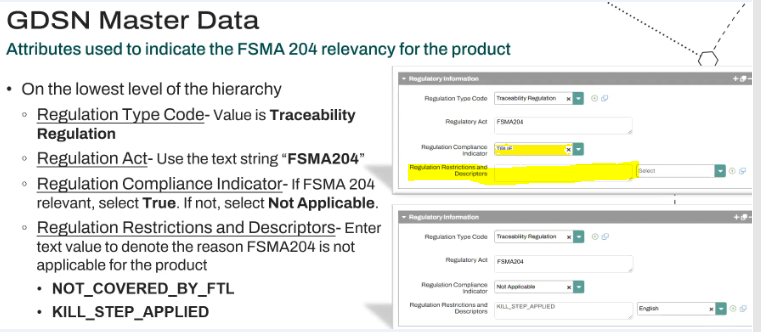
If it helps, we can also have a look at the GTIN to make sure it is currently syncing with your retailer as intended if you can provide us the item ID please. Thanks!
Options
- Mark as New
- Bookmark
- Subscribe
- Mute
- Subscribe to RSS Feed
- Permalink
- Report Inappropriate Content
06-09-2025 09:29 AM
Hi,
Thanks, Item ID is 10011140101691, please confirm it is currently syncing with GLN 0074865000000.
Ginny

Related Content
- Kroger/Syndigo publications in _Ask A Question for Item Management (IM)
- Error Messages after submitting FUSE sheet in _Ask A Question for Item Management (IM)
- CIC error-FSMA 204 in _Ask A Question for Item Management (IM)
- FSMA204 Regulations follow up - PFG requirement in _Ask A Question for Item Management (IM)
