11WorldSync Global Community
Turn on suggestions
Auto-suggest helps you quickly narrow down your search results by suggesting possible matches as you type.
Showing results for
- Customer Community
- Item Management
- IM Questions
- Re: Technical issues in IM
Options
- Subscribe to RSS Feed
- Mark Topic as New
- Mark Topic as Read
- Float this Topic for Current User
- Bookmark
- Subscribe
- Mute
- Printer Friendly Page
Technical issues in IM

Options
- Mark as New
- Bookmark
- Subscribe
- Mute
- Subscribe to RSS Feed
- Permalink
- Report Inappropriate Content
03-20-2025 10:51 AM
Good morning,
I have an ongoing issue that I'm going to see if anyone can help me with.
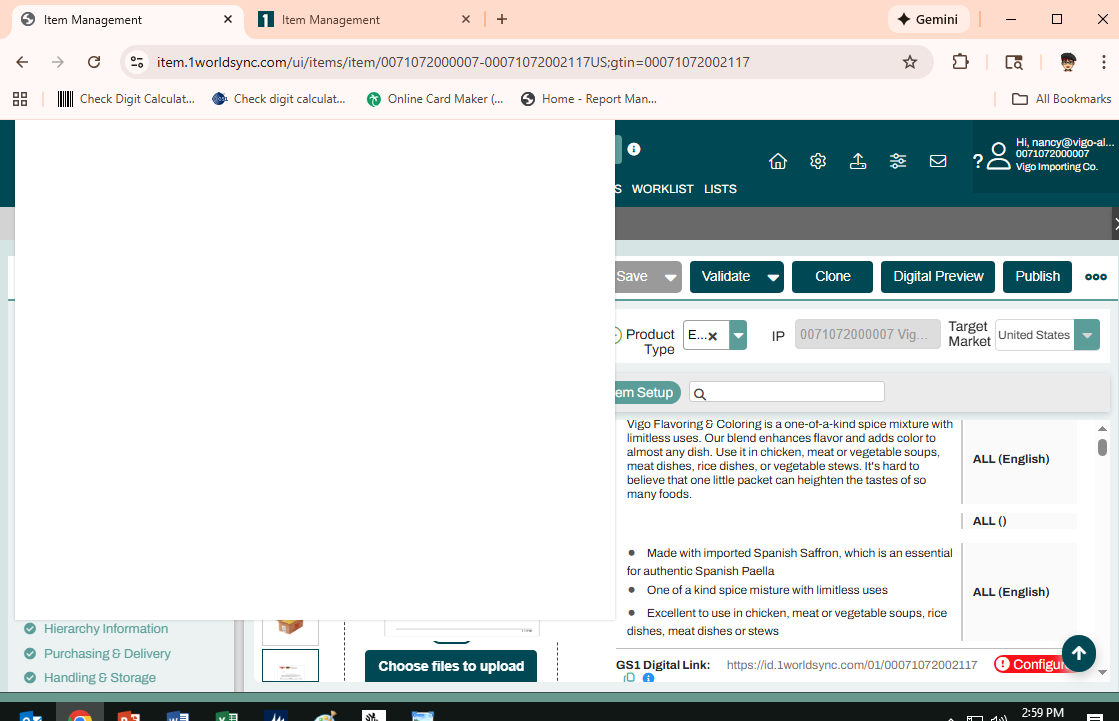
Often times when I'm working in IM a big large white box will appear, and there is NO working around it.
No matter what I'm in the middle of, I have to close out of 1WorldSync and start all over.
I've attached a picture of what I'm referring to.
I would love any input.
Thanks in advance!
A_Flower
63 Replies

Options
- Mark as New
- Bookmark
- Subscribe
- Mute
- Subscribe to RSS Feed
- Permalink
- Report Inappropriate Content
11-11-2025 03:04 PM
Good afternoon team and @A_Flower!
I just had the same issue happened back to back. Please, see screen shots with the time stamp on bottom right.
Thanks!

Options
- Mark as New
- Bookmark
- Subscribe
- Mute
- Subscribe to RSS Feed
- Permalink
- Report Inappropriate Content
11-11-2025 03:41 PM
Thank you for letting us know @nancyVigo, much appreciated!
We are still working to resolve this issue and we will keep you updated once we make headway with it. On our side it is sometimes difficult to reproduce it.
We always appreciated your assistance with this and any such issues as we try to make our systems perform as smoothly as possible. Thank you very much @nancyVigo and @A_Flower!
Options
- Mark as New
- Bookmark
- Subscribe
- Mute
- Subscribe to RSS Feed
- Permalink
- Report Inappropriate Content
11-11-2025 03:44 PM
@Val, you're welcome! 🙂


Options
- Mark as New
- Bookmark
- Subscribe
- Mute
- Subscribe to RSS Feed
- Permalink
- Report Inappropriate Content
11-11-2025 03:45 PM
Hello, @nancyVigo and welcome back.
Can you provide any additional details of what you were doing just before this occurred? I recall a similar issue around 1 year ago: if you hovered over an image to trigger the image zoom, and you were able to close the item tab before the image zoom window went away, there would be an empty white box in the upper left corner, as your screenshot shows. However, I am not able to reproduce this issue by following those same steps. If you have additional details, I would recommend submitting a ticket so that we can reproduce and escalate up to our development team to investigate further.
Options
- Mark as New
- Bookmark
- Subscribe
- Mute
- Subscribe to RSS Feed
- Permalink
- Report Inappropriate Content
11-11-2025 03:49 PM - edited 11-13-2025 10:34 AM
@DanV, all I do is hover over any of the images (mostly by accident as I am trying to reach the Item Attributes Sets on the left hand side). Once the box appears, it is impossible to get rid of it, except by closing the browser and login back on.
Options
- Mark as New
- Bookmark
- Subscribe
- Mute
- Subscribe to RSS Feed
- Permalink
- Report Inappropriate Content
11-12-2025 07:41 AM
Good morning,
I've had this happen in different browsers, as well. I've used Google and Microsoft Edge and had the same results. It always happens when you skim over an image.
This same issue happened during one of Travis Sterling's 1WorldSync webinars, and he also had to exit the page.

Options
- Mark as New
- Bookmark
- Subscribe
- Mute
- Subscribe to RSS Feed
- Permalink
- Report Inappropriate Content
11-12-2025 12:01 PM
Hello @A_Flower
Thank you for bringing this to our attention. We’ve been reviewing the issue you reported, but so far we haven’t been able to reproduce it on our end. Our team is continuing to look into it to identify what might be causing the problem.
If you have any additional information, such as screenshots, specific item details, or the steps that led to the issue, please share them with us to help us investigate further. Alternatively, as @DanV recommended, you can submit a ticket so we can attempt to reproduce the issue and escalate it to our development team for deeper investigation.
Thank you for your patience and cooperation while we work on this.
Options
- Mark as New
- Bookmark
- Subscribe
- Mute
- Subscribe to RSS Feed
- Permalink
- Report Inappropriate Content
11-13-2025 10:44 AM
Options
- Mark as New
- Bookmark
- Subscribe
- Mute
- Subscribe to RSS Feed
- Permalink
- Report Inappropriate Content
11-13-2025 12:17 PM

Options
- Mark as New
- Bookmark
- Subscribe
- Mute
- Subscribe to RSS Feed
- Permalink
- Report Inappropriate Content
11-13-2025 03:29 PM
I have had these things happen to me as well. I usually can click away from the box or frozen image and get out of it but often have to close out and reopen the website. I have never reported it because I am able to work around it, but It is a real issue.

Related Content
- Issue Logging In to Legacy 1WS Applications in IM Issues & Messages
- We receved an email stating an issue with the supplier price file of TD Synnex. W in _Ask A Question for Item Management (IM)
- Technical issues in IM? in _Ask A Question for Item Management (IM)
- 11.18.2025 Incident - Login to UMA and Product Introduction in IM Issues & Messages
- 10.20.25 - Incident in IM in IM Issues & Messages
