11WorldSync Global Community
Turn on suggestions
Auto-suggest helps you quickly narrow down your search results by suggesting possible matches as you type.
Showing results for
- Customer Community
- Item Management
- IM Questions
- Re: Kroger Error Messages after updating item
Options
- Subscribe to RSS Feed
- Mark Topic as New
- Mark Topic as Read
- Float this Topic for Current User
- Bookmark
- Subscribe
- Mute
- Printer Friendly Page

Options
- Mark as New
- Bookmark
- Subscribe
- Mute
- Subscribe to RSS Feed
- Permalink
- Report Inappropriate Content
3 weeks ago
1 Solution
Accepted Solutions

Options
- Mark as New
- Bookmark
- Subscribe
- Mute
- Subscribe to RSS Feed
- Permalink
- Report Inappropriate Content
3 weeks ago
Hello @nancyVigo, it's great chatting with you again.
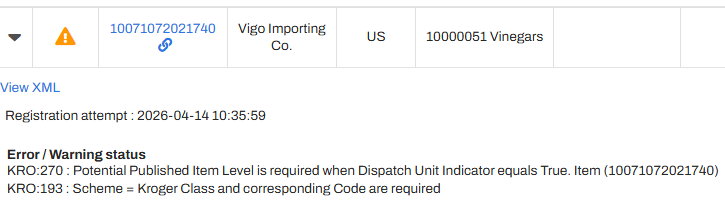
I noticed GTIN 10071072021740 is currently not published to Kroger through the API GLN(s)/ process. If you do not need to publish the item to Kroger through API now, you can then remove the Kroger playlist from all hierarchy levels until the publication is necessary. The attributes referenced in the Warning are mandatory for Kroger for the new process. We are here for you in case anything else is needed, please. Thank you. 🙂
2 Replies
Options
- Mark as New
- Bookmark
- Subscribe
- Mute
- Subscribe to RSS Feed
- Permalink
- Report Inappropriate Content
3 weeks ago
Hello @nancyVigo, it's great chatting with you again.
I noticed GTIN 10071072021740 is currently not published to Kroger through the API GLN(s)/ process. If you do not need to publish the item to Kroger through API now, you can then remove the Kroger playlist from all hierarchy levels until the publication is necessary. The attributes referenced in the Warning are mandatory for Kroger for the new process. We are here for you in case anything else is needed, please. Thank you. 🙂
Options
- Mark as New
- Bookmark
- Subscribe
- Mute
- Subscribe to RSS Feed
- Permalink
- Report Inappropriate Content
3 weeks ago
@Val, good morning and thank you!

Related Content
- Kroger Error Messages after updating item in _Ask A Question for Item Management (IM)
- Kroger API Playlist Issue in _Ask A Question for Item Management (IM)
- Kroger Error Message API in _Ask A Question for Item Management (IM)
- Item Returned for Review - calories, sodium, fat, total carb protein in _Ask A Question for Item Management (IM)
- Kroger API in _Ask A Question for Item Management (IM)
