Enhanced Content
cancel
Showing results for 
Search instead for 
Did you mean: 

Knowledge Base Articles

Assisted Load

What is Assisted Load? The Assisted Load offers Enhanced Content customers a one-time service where Syndigo will upload and publish your Enhanced Content on your behalf, allowing you to focus on onboarding or other tasks.   Who can utilize Assisted ...
Widget Authoring Best Practices

This article details the recommendations for assets and other widgets added to Enhanced Content. All recommendations are based on an average screen size of 1080px. An example preview following the below requirements can be viewed in the Puppy Produc...

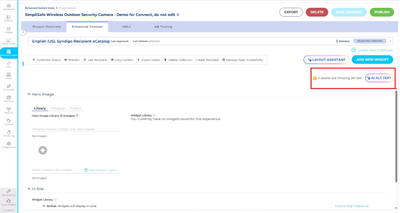
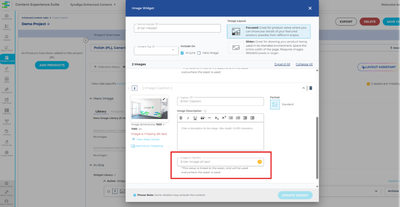
Alt Text for Images in Enhanced Content

Article Contents: OverviewWhat is Alt Text?Why Alt Text is ImportantBest Practices for Alt TextHow to Input Alt Text in SyndigoImport Final Step: Republish Enhanced ContentNeed Help?   Overview Alt text (short for “alternative text”) is a written de...

CommunityMod_WM_2-1779887137922.png CommunityMod_WM_3-1779887179233.png CommunityMod_WM_4-1779887193473.png CommunityMod_WM_5-1779887212757.png

Model Formatting for 3D/Augmented Reality Widget

Model Formats:   3D models: Can come in the form of .glb or .usdz (Apple/iOs only) glb model Format: .glbMax size: 100 MB usdz model Format: .usdzMax size: 100 MB   Widget Definitions:   Augmented Reality: Leverages 3D model and places it in the use...

Enhanced Content Layout Assistant

  What is Layout Assistant? Layout assistant is a new tool designed to help you build Enhanced Content layouts without the need to manually construct widgets.  Please note: This AI tool does not generate content, text, or imagery. Layout Assistant ...

ECLayout1.png ECLayout2.png ECLayout3.png ECLayout4.png

Live Enhanced Content Examples

View live enhanced content examples across various industries. Choose a category to view live examples and widgets. ApparelAutoBabyBeautyElectronicsHardlinesPetsSporting Goods   Apparel Adidas at Dick's Sporting GoodsLevi's at JCPenneyColumbia at Ko...

ECex1+(1).gif ECex2.png ECex3 (1).gif ECex4.gif

Programmatic Enhanced Content Creation Options

Managing product content at scale can be a significant challenge for brands with limited time and resources. Syndigo simplifies this process with seamless, hands-free solutions designed to efficiently create and deploy enhanced content across extens...

Enhanced Content Spreadsheet Imports

Spreadsheet import is one of Syndigo’s programmatic enhanced content creation solutions. A simple spreadsheet with basic product information, marketing copy, and creative assets is ingested to produce ready-to-publish enhanced content that follows a...

Enhanced Content Data View

Unlocking Efficiency and Scale: Benefits of Using Enhanced Content Data View for Your Projects Creating and managing Enhanced Content at scale can be a complex, manual upload-heavy process - but it doesn’t have to be. Syndigo’s Enhanced Content Data...

dataview1.png dataview2.png dataview3.png dataview4.png

Publish Enhanced Content

Publish Enhanced Content to websites. Website Connections are retailer websites that can accept Enhanced Content, which includes assets such as a product comparison table, image carousel, and video. Though there is an Enhanced Content requirement s...

Adding Device Targeting

Within the Feature Set and Image Widget, Device Targeting allows users to control what asset is displayed based on the size/width of the shopper’s screen or device. It is most advantageous for ensuring the shopper sees the most important details of ...

Copy Enhanced Content

Save time by copying Enhanced Content from one Project to another. To efficiently manage Enhanced Content between Projects, Enhanced Content may be duplicated from one Project to another. Once copied over, Widgets can be edited, rearranged, or dele...

Create Enhanced Content

Article Contents: Create an Enhanced Content Project Create New Enhanced Content Add Products to the Project  Remaining Prep for Publication    Create an Enhanced Content Project Before building Enhanced Content, you must create an Enhanced Content...

Syndication Category Templates

Syndication has conversion-based data and insights available to provide best practice templates at a product category level. Because we are able to track conversion data on many sites worldwide, we know which widgets yield the best conversion rates ...

General Enhanced Content Guidelines

Keep these QA guidelines in mind to make the review process for Enhanced Content as smooth as possible. When you publish to Enhanced Content recipient connections, the content moves the collection to “In Review” with a Moderation Status of “Pending”...

Manually Map Enhanced Content to Retailer Site

Mapping your URLs to your products, ensures that their Enhanced Content appears on retailer websites when published. Your product URLs act as an endpoint that lets Syndigo know where on the internet to send your content to. There are two ways to map...

ManualMap1.jpg ManualMap2.jpg

Preview Enhanced Content

View Enhanced Content as it may appear on a retail website. The Preview feature offers an idea of how Enhanced Content may appear on a Connected Website. When previewing Enhanced Content, the display reflects styles, layout, and business rules asso...

Enhanced Content Collections

  Article Contents: Create a CollectionAccess a Previously Created CollectionDelete a CollectionCheck Collection Status   Users can create multiple “folders” of Enhanced Content, which are referred to as Collections in Content Experience Suite. The...

ECcoll1.jpg ECcoll2.jpg ECcoll3.png ECcoll4.png
Labels
Top Contributors