SSyndigo Global Community
Turn on suggestions
Auto-suggest helps you quickly narrow down your search results by suggesting possible matches as you type.
Showing results for
- Customer Community
- Item Management
- IM Questions
- Re: Kroger error on nutritionals
Options
- Subscribe to RSS Feed
- Mark Topic as New
- Mark Topic as Read
- Float this Topic for Current User
- Bookmark
- Subscribe
- Mute
- Printer Friendly Page

Options
- Mark as New
- Bookmark
- Subscribe
- Mute
- Subscribe to RSS Feed
- Permalink
- Report Inappropriate Content
10-13-2021 01:12 PM
Good afternoon,
I am getting an error on Kroger for nutritionals in IM. I've received it for several items, but I'm not seeing where I'm missing anything. I am using their list of nutritional and ingredient data sheet.
Can you please tell me what I'm missing?
I'm wondering if it may be the kilocalorie being used now instead of the calories.
1 Solution
Accepted Solutions


Options
- Mark as New
- Bookmark
- Subscribe
- Mute
- Subscribe to RSS Feed
- Permalink
- Report Inappropriate Content
10-20-2021 03:55 PM
Andrea,
The USDA would like to get 100 unit date (BY_MEASURE). Retailers want serving size (BY_SERVING). The USDA will take serving size if that is all that is provided to them. The key here is the Warning which will not stop the publication to any recipient, but they return that message to advise of their request.
13 Replies
Options
- Mark as New
- Bookmark
- Subscribe
- Mute
- Subscribe to RSS Feed
- Permalink
- Report Inappropriate Content
10-13-2021 01:20 PM - edited 10-13-2021 01:21 PM
Kroger Nutrifacts Requirement – There are five Nutrifacts that are checked for completeness when an item is submitted.
The Nutrient Basis Quantity Type Code that should be used is BY_SERVING, otherwise, no nutrient content flows downstream in Kroger’s system.


Options
- Mark as New
- Bookmark
- Subscribe
- Mute
- Subscribe to RSS Feed
- Permalink
- Report Inappropriate Content
10-13-2021 01:41 PM
How are there errors from Kroger if there is no Kroger playlist?
Options
- Mark as New
- Bookmark
- Subscribe
- Mute
- Subscribe to RSS Feed
- Permalink
- Report Inappropriate Content
10-13-2021 01:48 PM
Thank you!
I have made the adjustment. Hopefully this will not flag errors with other subscribers.
Do you know if I'm safe to switch all items over to "By_Serving"?
Options
- Mark as New
- Bookmark
- Subscribe
- Mute
- Subscribe to RSS Feed
- Permalink
- Report Inappropriate Content
10-13-2021 01:58 PM
Although there isn't a Kroger playlist, you can go to their landing page and get their attribute requirement. If you miss any, you will receive a "Review" on the home page in item management telling you the missed attributes.
Options
- Mark as New
- Bookmark
- Subscribe
- Mute
- Subscribe to RSS Feed
- Permalink
- Report Inappropriate Content
10-19-2021 02:53 PM
Options
- Mark as New
- Bookmark
- Subscribe
- Mute
- Subscribe to RSS Feed
- Permalink
- Report Inappropriate Content
10-20-2021 11:20 AM
Andrea,
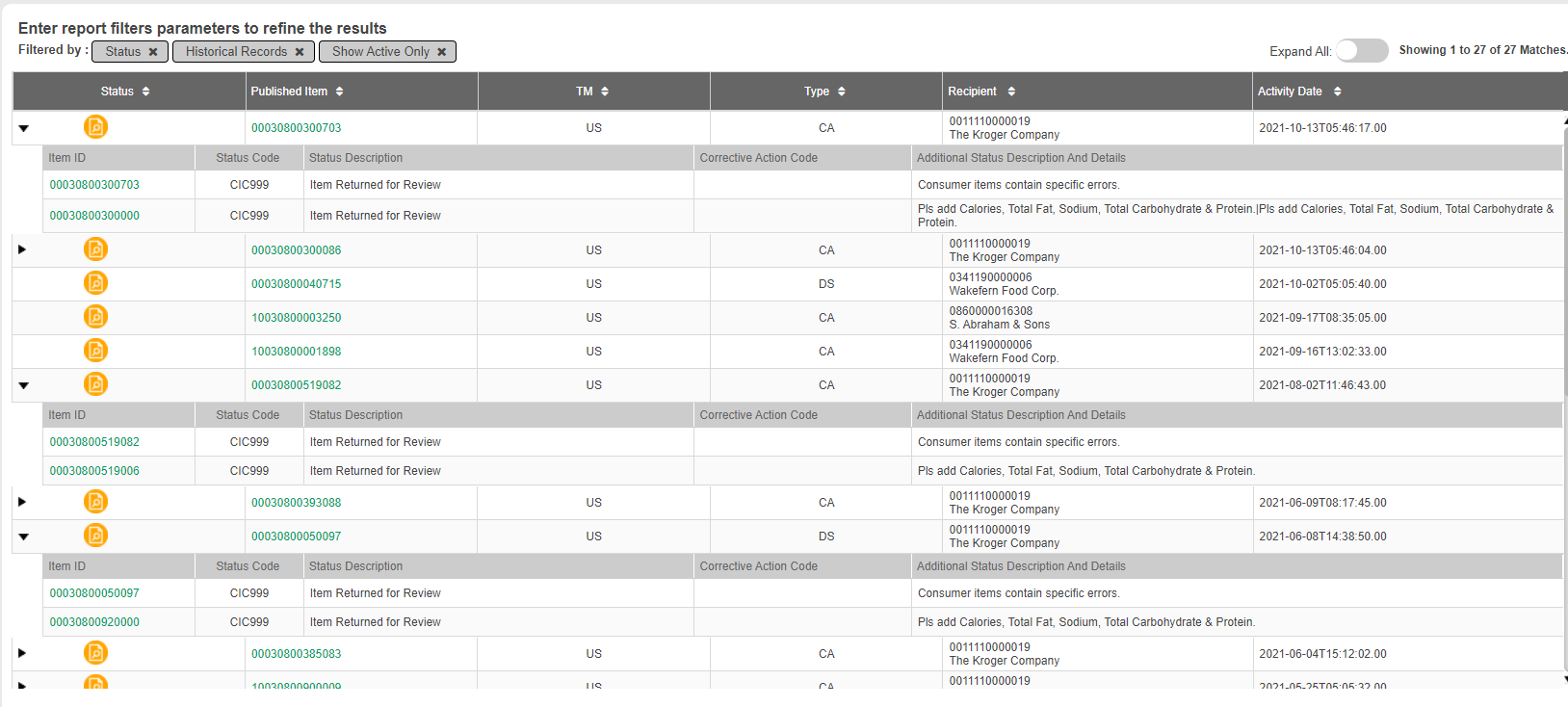
I called the Kroger Supplier Engagement team to see if they might narrow down the specific attribute they want added and where Parent or Child GTIN. I was advised that the Parent GTIN will also need to have all five nutrients to be submitted. I noticed that both parents are missing the FAT.
00030800300086:CIC999:Item Returned for Review:Consumer items contain specific errors.~00030800300000:CIC999:Item Returned for Review:Pls add Calories, Total Fat, Sodium, Total Carbohydrate & Protein.|Pls add Calories, Total Fat, Sodium, Total Carbohydrate & Protein.
No FAT on the parent GTIN
00030800300703:CIC999:Item Returned for Review:Consumer items contain specific errors.~00030800300000:CIC999:Item Returned for Review:Pls add Calories, Total Fat, Sodium, Total Carbohydrate & Protein.|Pls add Calories, Total Fat, Sodium, Total Carbohydrate & Protein.
The Parent is still by Measure
No FAT but there is FATLNEA -
The Supplier Engagement team provided ticket 22754979 in case we should need to contact them again.
Options
- Mark as New
- Bookmark
- Subscribe
- Mute
- Subscribe to RSS Feed
- Permalink
- Report Inappropriate Content
10-20-2021 11:23 AM
Thank you so much, Charles!
I will make these adjustments.
I have always had nutritionals on all hierarchies, but was previously told that Kroger only requested nutritionals at the each level.
Good to know that is no longer true.
Options
- Mark as New
- Bookmark
- Subscribe
- Mute
- Subscribe to RSS Feed
- Permalink
- Report Inappropriate Content
10-20-2021 11:49 AM
Does this mean nutritionals are needed on EVERY level? I have not had this issue with any items sent to Kroger. I provide them only on the each level
Options
- Mark as New
- Bookmark
- Subscribe
- Mute
- Subscribe to RSS Feed
- Permalink
- Report Inappropriate Content
10-20-2021 02:23 PM


Related Content
- Error Code the item is not currently active in _Ask A Question for Item Management (IM)
- Setting up a Subscription in _Ask A Question for Item Management (IM)
- Error Messages Triggered By Kroger After Updating Item in _Ask A Question for Item Management (IM)
- Kroger API - Resolve CIC Messages - Product Description in _Ask A Question for Item Management (IM)
- We have an ACTION_NEEDED & resubmitted as NEW please help [CIC999] in _Ask A Question for Item Management (IM)
