11WorldSync Global Community
Turn on suggestions
Auto-suggest helps you quickly narrow down your search results by suggesting possible matches as you type.
Showing results for
- Customer Community
- Item Management
- IM Questions
- Re: Kroger Error Message API
Options
- Subscribe to RSS Feed
- Mark Topic as New
- Mark Topic as Read
- Float this Topic for Current User
- Bookmark
- Subscribe
- Mute
- Printer Friendly Page
Kroger Error Message API

Options
- Mark as New
- Bookmark
- Subscribe
- Mute
- Subscribe to RSS Feed
- Permalink
- Report Inappropriate Content
Thursday
Good morning team!
Our items were migrated to 1WS recently from VIP and I have noticed a number of errors popping up with items that have already been synchronized with other customers, even though I have not published them to Kroger API yet.
Please, find attached one of the error messages for Gtin 10071072003029. I did a search looking for the "price" they are referring to, but cannot find any prices filled out anywhere.
Whenever I do have to publish an item to Kroger with the new system, how do I enter prices and other pertinent information without the rest of our customers seeing it?
Thanks in advance!
9 Replies

Options
- Mark as New
- Bookmark
- Subscribe
- Mute
- Subscribe to RSS Feed
- Permalink
- Report Inappropriate Content
Thursday
Hello, @nancyVigo, it’s good chatting with you again.
Can you please let us know which retailer you are having issues with for GTIN 10071072003029, please? We can currently see 2 Review messages for this publication, both referring to the Count of This Specific Item in a Non-GTIN Logistic Unit/NonGTIN Pallet Quantity attribute which must be provided and it already is, so most likely the retailer has not yet reviewed the updated information.
Once update we can suggest for the Case though is removing the GTIN Pallet Ti and Hi information, please. This is because there is no GTIN assigned to a Pallet and publsihed to the retaielrs in this hierarchy, therefore only the Non-GTIN Ti and Hi should be added. More details here: TI / HI Validations.

Back to your questions and to how retailers receive the Kroger information from IM. All Kroger specific attributes are sent to Kroger only. You can find them in Item Management by checking for the "kro" abbreviation at the beginning of the attribute name in the Item Attribute Sets search on the item page:


Hope this helps. We are here for you if anything else comes up, please. Thanks! 🙂
Options
- Mark as New
- Bookmark
- Subscribe
- Mute
- Subscribe to RSS Feed
- Permalink
- Report Inappropriate Content
Thursday
@Val, thanks for the prompt response!
I actually attached the wrong screen shot (FSMA204) instead of the one referring to the price issue from Kroger.
Please, see correct attached screen shot.

Options
- Mark as New
- Bookmark
- Subscribe
- Mute
- Subscribe to RSS Feed
- Permalink
- Report Inappropriate Content
Thursday
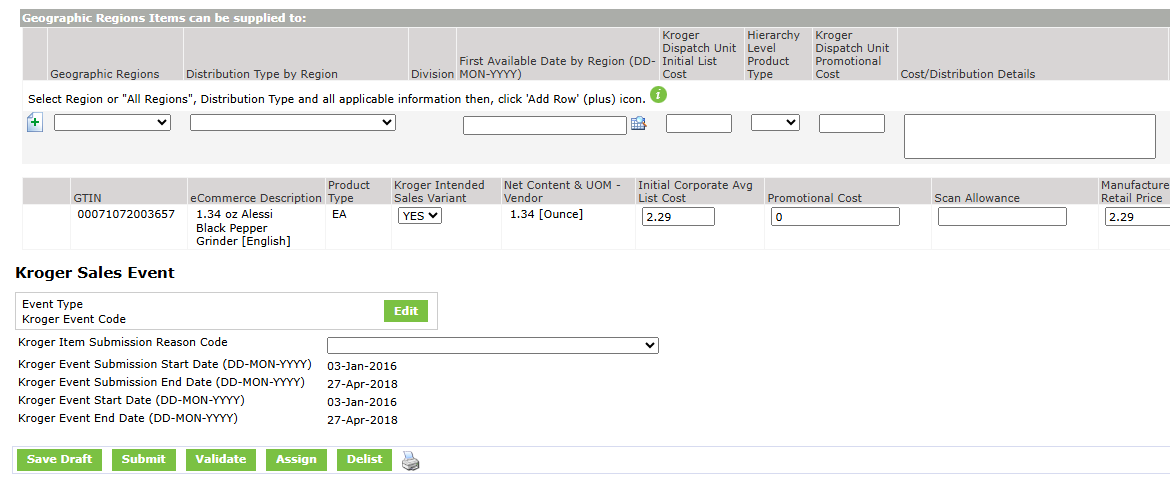
@Val, Please, find attached two more screen shots showing error messages for Gtin 20071072003651 in 1WS, as well as one showing the item in Product Introduction (the dates are pretty old and I would not have any idea of what to enter as far as region, event type, sales event, etc.
Thanks!

Options
- Mark as New
- Bookmark
- Subscribe
- Mute
- Subscribe to RSS Feed
- Permalink
- Report Inappropriate Content
Thursday
Thank you very much for the additional info, @nancyVigo 🙂
Once you start using the API process for Kroger, you can ignore any messages and CICs from The Kroger Company GLN, please. If you need to update information for those items, you can do so by ensuring you have the Kroger playlist added in IM on all hierarchy levels and successfully validating your items. If you need new IMF numbers, the Submission Reason Code needs to be added on the highest hierarchy level along with the new distribution details, or, if an IMF is required for the same distribution previously added in PI, then the old/existing IMF needs to be Rejected by Kroger first (the process has not changed here) and you can then publish to the Certification Queue GLN for the review and, once Synchronized, publish to the Certified Items GLN.
Hope this helps. Thanks!
Options
- Mark as New
- Bookmark
- Subscribe
- Mute
- Subscribe to RSS Feed
- Permalink
- Report Inappropriate Content
Thursday
@Val, thanks again! I guess I need to navigate this process to get the hang of it! 😉
Options
- Mark as New
- Bookmark
- Subscribe
- Mute
- Subscribe to RSS Feed
- Permalink
- Report Inappropriate Content
Thursday
It's always a please, @nancyVigo, we are here for you please and delighted to help when needed.
Options
- Mark as New
- Bookmark
- Subscribe
- Mute
- Subscribe to RSS Feed
- Permalink
- Report Inappropriate Content
yesterday
@Val, good afternoon! I recently cloned an item so that I could publish it to PFG.
The Kroger playlist was already showing at the top of the page, so I clicked on it to grey it out.
Even after doing this, I noticed prices and other attributes that are just for Kroger still showing up.
Can you shed some light on this? Do I need to completely close the Kroger playlist when I am working with other customers instead on clicking on it?
Thanks in advance!
Options
- Mark as New
- Bookmark
- Subscribe
- Mute
- Subscribe to RSS Feed
- Permalink
- Report Inappropriate Content
yesterday
Hello, @nancyVigo, it's great chatting with you again! 🙂
Cloning an existing item will copy all of the attributes to the new item except for the GTIN or Target Market. Deactivating or removing the Kroger playlist does not remove the attributes, it just means they are no longer visible in the user interface (unless All Populated is active, as this will by default show all attributes, even if all other playlists are removed).
When working on an existing item to publish it to a new retailer, you can disable/remove all other playlists to ensure the Errors/Warnings you see are for the intended retailer and not generated by another playlist. You can add the other playlists back again on the items in the hierarchy once you have published to the new retailer.
When cloning, in general we can suggest cloning an item published to the same retailer or as similar set of retailers as possible (so that, in your example, it does not copy some of the Kroger attributes to other retailers). In general, providing more attributes than the mandatory and recommended ones is not bad, but this can be detrimental for certain attributes like pricing for example. The Kroger Dispatch Unit Initial List Cost and the Initial Corporate Avg List Cost are Kroger-specific attributes and are sent to Kroger only, so for these 2 attributes at least you can rest assured no other retailers will receive this information, but there are other fields in IM where cost/pricing can be added and those fields are visible to all retailers.
Hope this helps.Thanks!
Options
- Mark as New
- Bookmark
- Subscribe
- Mute
- Subscribe to RSS Feed
- Permalink
- Report Inappropriate Content
6 hours ago
@Val, good morning!
Thanks so much...this is helpful!
I will be participating in tomorrow's Kroger API webinar and hope to get more guidance in how to navigate API whenever I need to publish new items to Kroger.
Have a great day! 🙂

Related Content
- Kroger Error Message API in _Ask A Question for Item Management (IM)
- Assistance in resolving error KI16253 Component Description in _Ask A Question for Item Management (IM)
- End Availability Date Error in _Ask A Question for Item Management (IM)
- Error Message After Trying to Clone Item in _Ask A Question for Item Management (IM)
- CASE - Hierachy information in _Ask A Question for Item Management (IM)
