The Enhanced Content Dashboard highlights some of your most valuable data while simultaneously exposing areas of opportunity. Below are some examples of the types of insights you may gain from the EC Dashboard.
Totals Box
The Totals box on the top left of the dashboard displays general numbers related to products, Projects, and Enhanced Content.
-
Products – The number of “active” products in your account.
-
Products Linked to a Project - The number of “active” products that are linked to a Project.
-
Total Enhanced Content Projects - The number of EC Projects that are in your account.
-
EC Website Connections - The total number of connected Websites that have been added to your account.
Performance & Opportunities Card
 ECDash.png
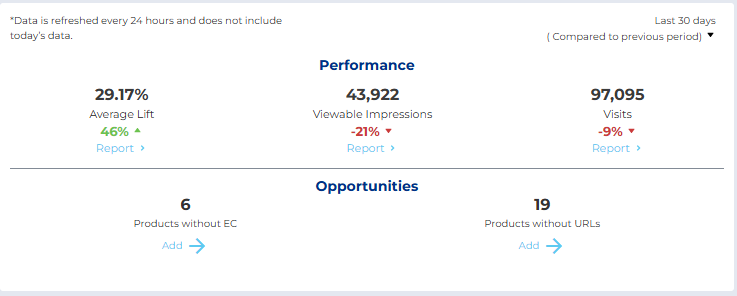
Performance Area:
Date Comparisons - In all cases when two dates are compared to each other, it is a good thing for the trend to be positive.
- Average Lift - If Average Lift is down compared to another period this could be a sign that Enhanced Content needs an update to be more engaging or more effective. In addition to In-Line Content, adding Hero Content has proven to be very effective at improving Add to Cart rates, thus improving Average Lift of EC. If there is a desire to improve Average Lift, adding Hot Spots experiences is heavily encouraged.
- Viewable Impressions - Viewable Impressions could be down naturally and expectedly for a number of reasons. However, if the trend is down unexpectedly it is worth checking the number of products without EC as well as the number of products without product pages. Clicking Report will show further details on impressions per site and per product.
- Visits - Visits could also be down naturally and expectedly. Also, Visits are only possible with widgets that have clickable elements such as the carousel widget. If content has been updated to not include these widgets that isn't necessarily a bad thing as long as Average Lift and Impressions trends are still positive.
Opportunities Area:
- Products without EC shows a count of products that DO NOT have Enhanced Content associated with them. These products may not be expected to have EC associated with them but if is expected, added to an existing Project or create a new Project for them. Clicking Add will direct you to the Product Index and show a filtered view of products that do not have EC associated with them.
- Products Without URLs shows a count of products that do not have any mappings or product pages. A product may not have product pages if none have been manually added or if auto-mapping has not occurred. A list of unique IDs required per site for auto-mapping can be found in the Site Information Card.
Recent Updates & Notifications
The card on the right contains the most recent updates and notifications for Projects and products in your account.
- Recent Updates - this shortcut is a scrollable list of the most recently updated products in your account. Click a product from the list to open its Product Details page.
- Notifications - contains Project publication notifications, and status changes
Collection Status Tracker
The Collection Status Tracker communicates where in its lifecycle a collection currently is.
If the expectation is that there should not be many collections with the status “Unpublished,” then click the Unpublished status to be directed to the EC index to review and publish collections.
If many collections appear to be “Rejected” then those collections could either have changes pending if “Rejected” & “Changed Since Last Published” or need to be modified as per the rejection feedback and published again.
Site Information Card
Here, you can see how many products are mapped to a particular site. If the expectation is that many more products should be mapped to that site, then products may need to have attributes associated with them to enable auto-mapping such as GTIN or Brand Labels. You may also manually map products by adding product page urls to their product. If the count of mapped pages seems low for a particular site, check that the products have the “Automapping Unique IDs” required per site as an attribute.
Announcements Card
Here you can receive important announcements or invites to events from Syndigo.


